Text message opt-in
Effective October 8, 2026
BinRoster sends transactional text messages about dumpster rentals, such as delivery and pickup updates, only to people who opt in. Opting in is always optional and is never a condition of renting. No marketing messages are sent.
Dumpster rental companies use BinRoster to take bookings and run their deliveries. Their customers can opt in to text updates in two places. Both are shown below as customers see them. The checkboxes start unchecked.
Online booking form
When a customer books a rental online, they enter their name, email and phone number, then review the price and rental terms. The form has two separate checkboxes: a required one for the rental terms and privacy policy, and an optional one for text messages, followed by the text message disclosures:
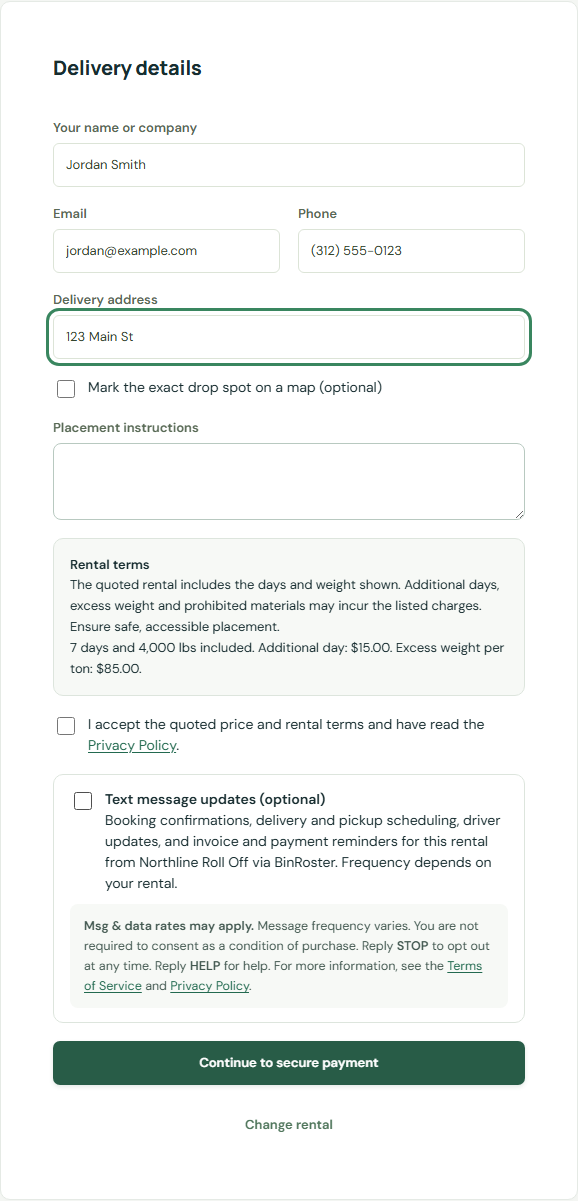
A booking goes through whether or not the box is checked. When it is checked, BinRoster records the phone number, the time and the consent wording with the booking.
Customer portal
Customers who already have a rental can sign in to the rental company's customer portal and turn on text notifications. They enter their mobile number and check a required consent box:
To prove they own the number, the customer then texts a one-time code shown in the portal (VERIFY followed by the code) from that phone to the
number shown. Texts start only after the code is received. BinRoster records the number, the time and the consent wording.
After opting in
Booking form. After submitting, the customer pays on the secure payment page and sees an on-screen booking confirmation. If they checked the text message box, their first text confirms the subscription:
- "Northline Roll Off via BinRoster: Booking confirmed. Delivery 2026-10-14; pickup 2026-10-21. You're subscribed to text updates for this rental; msg frequency varies, msg & data rates may apply. https://app.binroster.com/portal?company=… Reply HELP for help, STOP to opt out."
Customer portal. After the customer texts their one-time VERIFY code, they receive this confirmation and the portal shows the phone as verified:
- "Northline Roll Off via BinRoster: You're subscribed to rental text updates. Msg freq varies. Msg & data rates may apply. Reply HELP for help, STOP to opt out."
What you receive
Messages are about your own rentals. Each one names the rental company and BinRoster, links to your customer portal and says how to opt out. Examples:
- "Northline Roll Off via BinRoster: Booking confirmed. Delivery 2026-10-14; pickup 2026-10-21. https://app.binroster.com/portal?company=… Reply HELP for help, STOP to opt out."
- "Northline Roll Off via BinRoster: Delivery scheduled for 2026-10-14. https://app.binroster.com/portal?company=… Reply HELP for help, STOP to opt out."
- "Northline Roll Off via BinRoster: Invoice 1042: $425.00, due 2026-11-13. https://app.binroster.com/portal?company=… Reply HELP for help, STOP to opt out."
Message frequency varies with your rentals, typically a few messages per rental. Message and data rates may apply.
Stopping texts
Reply STOP to any message and texts stop right away. You will receive one message confirming that you are unsubscribed. Reply START to subscribe again. Reply HELP for help, or email hello@binroster.com.
We do not sell or share your SMS opt-in data or personal information with third parties for marketing purposes. See the SMS terms and the privacy policy.